I want an always-on agent that can read a subset of my notes and manage tasks. I don't want it anywhere near the rest of my vault or personal data.
This documents a hyper-specific setup. My OpenClaw instance on my homeserver, with scoped access to one Obsidian folder, two-way sync, and OCR for handwritten e-ink notes. It was about 1-2 hours of work with OpenCode running Claude Sonnet 4.6. Overengineered for task management? Probably. But the whole thing was built in an afternoon. Hurray for ai-assisted building!
Why I care about task management
Keeping track of tasks is one of the most important things I do, at work and privately. Anything not written down either nags at the back of my head or gets forgotten. Over the years I've settled on three channels:
- Morning capture on paper. First thing I do is physically write down the tasks I want done that day, which is usually 3-10 items, with the most important ones marked. I used to do this on actual paper but switched to a Boox Go 10.3 tablet a few months back.
- Obsidian throughout the day. ~1900 notes: admin, work impact logs, side projects. My most-used notes are work references I keep appending to, and a living todo note updated almost daily. Finished todos get archived by a plugin, but managing categories and status is cumbersome.
- Phone for top-of-mind items. Quick capture into a task list app, moved to Obsidian once I'm at a desk.
I wanted to centralise this with an agent: give it granular access to my tasks, pipe in my handwritten notes via OCR, and let it categorise and remind me. Here's what I ended up with.
Architecture
(Mostly) courtesy of Opus 4.6:
┌────────────┐   ┌────────────┐
│ Boox Go103 │   │   Phone    │
│  (e-ink)   │   │ (Obsidian) │
└─────┬──────┘   └─────┬──────┘
      │ daily.pdf      │ vault sync
      ▼                ▼
┌───────────────────────────┐
│         OneDrive          │
└─────────────┬─────────────┘
              │
   rclone bisync (30s poll)
   + inotifywait (instant out)
              │
═══ Tailscale ╪════════════════════════════
              │
┌─────────────┼────────────────────────────────┐
│ homeserver  ▼                                │
│  ┌───────────────────┐                       │
│  │  obsidian folder: │◄── boox_ocr.py        │
│  │  88 - Automator/  │    (gpt OCR)          │
│  └─────────┬─────────┘                       │
│     :rw    │ volume mount                    │
│  ┌─────────┴──────────────────────────────┐  │
│  │ Docker                                 │  │
│  │  ┌───────────────────┐                 │  │
│  │  │  OpenClaw agent   ├──────────────── │──│ ──────► WhatsApp Business
│  │  └───────────────────┘                 │  │
│  │  ┌───────────────────────────────────┐ │  │
│  │  │ Home Assistant (monitoring sync)  │ │  │
│  │  └───────────────────────────────────┘ │  │
│  └────────────────────────────────────────┘  │
└──────────────────────────────────────────────┘
OneDrive is my cloud storage layer (backed up locally). The Boox has built-in OneDrive support. Obsidian syncs to OneDrive. Everything flows through it.
OpenClaw setup and isolation
Prompt injection can come from anywhere at any time, so I assume my OpenClaw instance can be compromised. If that happens, I want the exposure limited to a small set of notes/pii. No sensitive data, no keys.
OpenClaw runs in Docker Compose on my homeserver. I connect to it via a spare WhatsApp Business number. Outbound, the gateway is only exposed on my Tailscale tailnet.
The agent gets read/write access to exactly one folder, 88 - Automator, via a Docker volume mount:
volumes:
  - ./data/workspace/obsidian:/workspace/obsidian:rw
Enforcement via scoped mounts, not by prompt instructions. Some other mounts in the compose file are :ro (e.g., some of my server statuses which my agent reports on).
Syncing the folder with rclone bisync
My Obsidian vault uses paid sync between devices, but I didn't want to run a headless Obsidian instance on the server. I already had OneDrive set up for the vault, so I sync the single folder using rclone bisync:
rclone bisync \
  "onedrive_jakob:Home/Obsidian/MicroVault/88 - Automator" \
  /my/path/to/workspace/obsidian \
  --force \
  --conflict-resolve newer \
  ...
The sync script runs two loops:
- Poll loop (in): bisync every 30 seconds. Remote changes (phone, tablet) reach the agent within 30s.
- inotifywait loop (out): watches the local folder for writes and triggers an immediate bisync. Agent output appears in Obsidian on my phone within seconds rather than up to 30s. Not strictly required, but the faster outbound is nice. Drop it if you only care about async results.
The sync script writes a status file, which I show on my Home Assistant dashboard via a command_line sensor alongside some other statuses, agent usage, etc.
Agent workflow
The agent reads and writes markdown in 88 - Automator. I've instructed it to:
- Periodically review uncategorised tasks and sort them into the right category (dictated by headers in the file)
- Ping me on WhatsApp about stale or overdue items
- Accept new tasks sent via WhatsApp and add them to the file
Whether I add a task in Obsidian directly, via WhatsApp, or via handwritten notes (see below), it ends up in the same markdown file, categorised automatically. Same file I see in Obsidian.
Handwritten notes via OCR
Once the sync pipeline existed, it was cheap to plug in another data source. The Boox syncs a daily.pdf to OneDrive when I tap sync. I wanted those handwritten notes transcribed into Obsidian automatically.
The tablet has a built in OCR feature, but it performs much worse than current vision models. GPT vision-supported models handle handwriting better, in my opinion.
The same 30-second poll loop runs a small OCR script on each tick:
while sleep 30; do
  sync_now "poll"
  "$BOOX_OCR_SCRIPT" 2>>/home/falcon/my_home/logs/boox-ocr.log || true
done
boox_ocr.py is a self-contained uv inline script (explicitly mentioning, since this is an awesome way of running scripts/managing deps!).
What it does:
- Downloads
daily.pdffrom OneDrive via rclone - Checks a state file for the last-seen page count. It skips if the PDF hasn't grown (I only want to OCR after my morning task intake).
- Renders the last page to PNG using PyMuPDF
- Sends it to gpt to transcribe handwriting into Markdown
- Writes
boox_daily/YYYY-MM-DD.mdinto the synced Obsidian folder - Updates the state file
Because the output lands in the bisync'd folder, inotifywait catches it and pushes to OneDrive immediately. The transcribed note appears in Obsidian on my phone within seconds.
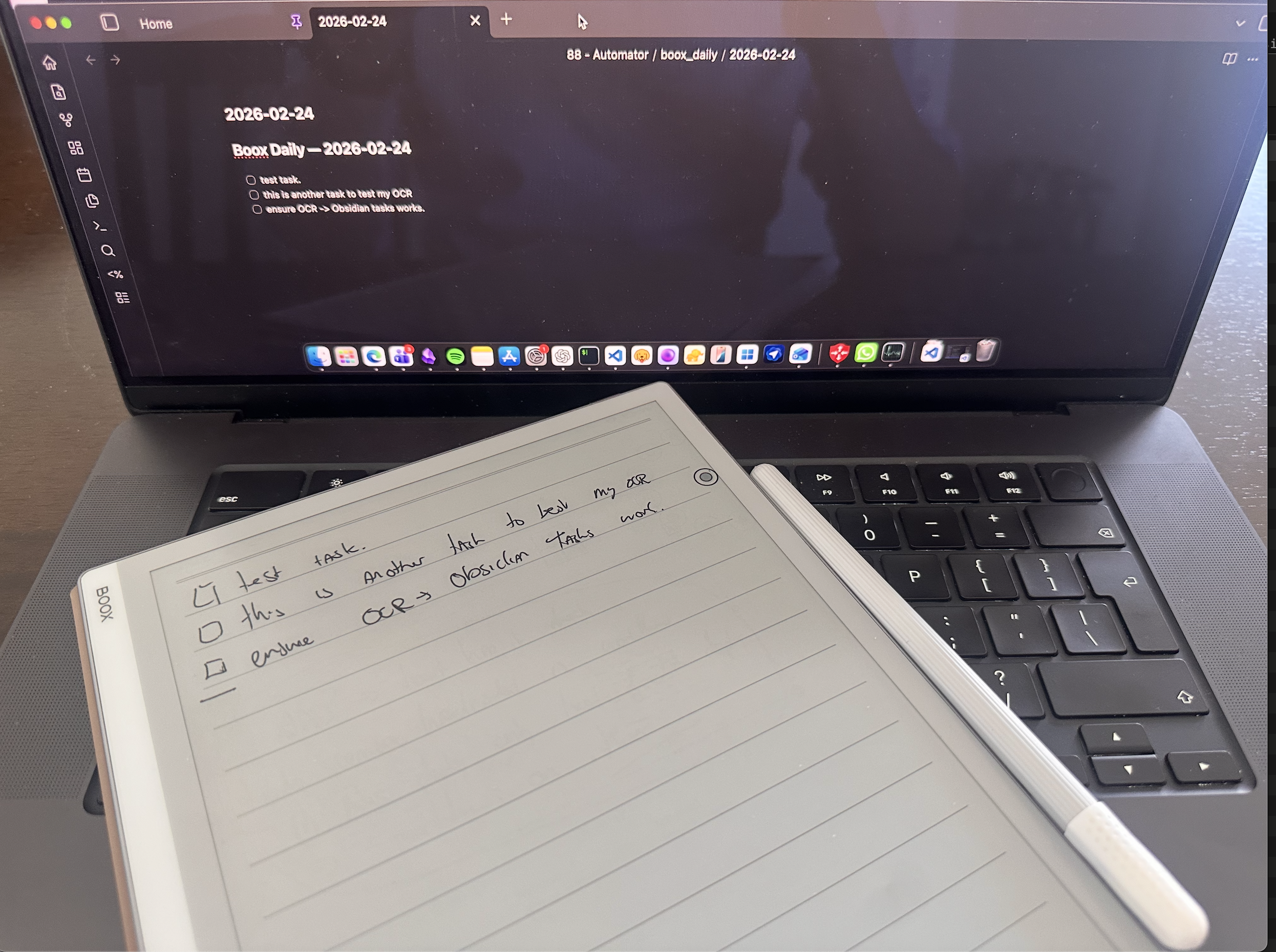 Hurray! It worked!
Where this leaves me
My handwritten, phoned-in, and Obsidian tasks are automatically categorised and reviewed by the agent. The pipeline gives me granular, kernel-enforced control over what my personal AI assistant can access. I'm surprised how well it works in practice. The main gain isn't task execution (other agents handle that) but the organisation of personal information.
I'm going to keep experimenting with scoped information access for agents. The pattern of "volume mount as blast radius boundary" generalises well IMO. And again, as a builder I rejoice with the speed gained using AI-assisted coding tools for these projects!
Comments
No comments yet.
Stored via Netlify Functions & Blobs. Do not include sensitive info.